Network Automation
Switching Sides
The Setup
I bought a managed switch to be the first real hardware in this lab. The plan: a real multi-VLAN topology, config declared as code, wrapped in the same Nornir automation I'd already proven in Cisco Auditor. A read-only audit tool becomes a tool that writes config.
That's about where the plan stopped being a plan.
Buying a Switch That Couldn't Switch
The size constraint was the point going in, not something I discovered later. My lab lives on a basket in my son's room next to the ThinkPad, and a five-port TP-Link TL-SG105E fits that footprint without a second thought.
For what it is, I'll give this switch credit: real 802.1Q VLAN tagging, a clean web GUI, port stats. This isn't a story about me buying the wrong hardware.
It's a story about hardware that does a lot, just not the one thing I actually needed. Nornir and Netmiko script against a CLI. "Easy Smart" means a web GUI and a proprietary Windows utility, nothing else. No SSH, no CLI, no documented API.
Checked what a CLI-capable switch would've cost instead, out of curiosity. A used Catalyst 2960 runs $35-90, cheap enough. Then I checked the dimensions: full 1U rackmount, 17 inches wide, the exact opposite of the constraint I'd already solved on purpose.
Know which range of "managed" you actually need before you buy, not after.
Going Virtual Instead
Dropping the physical switch turned out to be less of a downgrade than it felt like. New plan: two virtual Cisco switches, staging and production, in GNS3, on my own machine.
Then GNS3 refused outright: "The GNS3 VM is not available, please configure the GNS3 VM before adding a new appliance." Went into GNS3's own source instead of guessing through menus a fourth time, and found the real answer: on Windows, this device class requires KVM, a Linux kernel feature that doesn't exist on Windows under any configuration. Not a misconfiguration, a dead end.
KVM is a Linux feature. I already own a Linux machine, the ThinkPad running this entire lab. New plan: GNS3's GUI stays on my laptop, the switches run as a VM on the ThinkPad instead, over the network.
Getting that server VM actually running took longer than it should have. The systemd unit had a stray -- in it that was silently swallowing the --config flag, so the server was booting with SSL working but every other setting in its own config file quietly ignored, including the auth settings. Nobody logging into that web UI, because nothing was checking a password at all.
A setting that looks like it's working can still be silently ignored everywhere else in the same file.
Getting the Switches to Take Orders
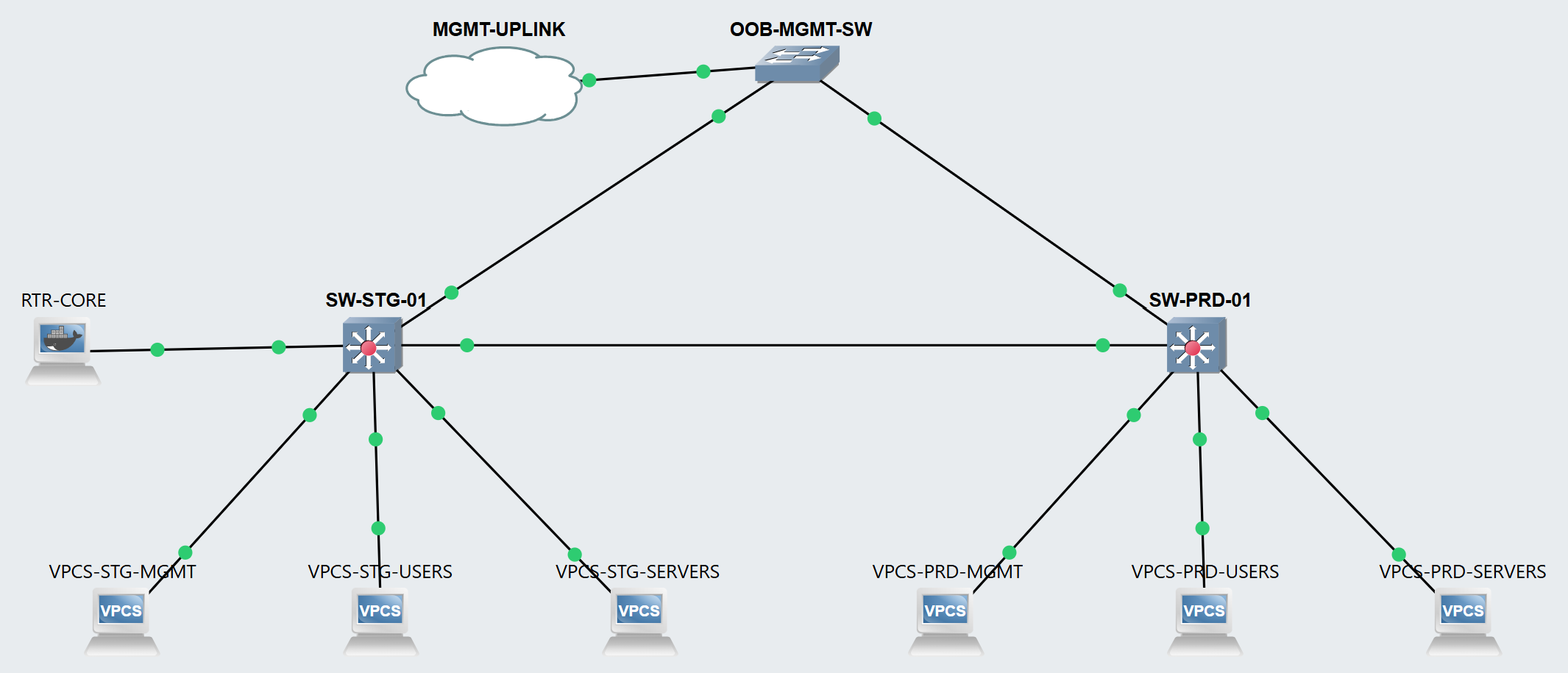
Wiring the topology surfaced one more GNS3 quirk: a Cloud node can't fan one host interface out to two separate links, it only offers other, useless virtual interfaces once the first port is taken. Fix was a plain switch node in between, arguably more realistic anyway. A real out-of-band network reaches multiple devices through a switch, not a split cable.
The first real SSH attempt from a modern Windows OpenSSH client to either Cisco switch failed three times in a row, each fix uncovering the next: no matching key exchange, then no matching host key type, then no matching MAC. All three needed together. IOS's SSH stack predates the algorithm defaults every client ships with today, and once diagnosed it's a one-line client flag, not a switch misconfiguration.
With both switches finally taking orders, I wrote the actual pipeline: VLANs, trunk ports, and access ports declared once in YAML, rendered into real Cisco config with Jinja2, pushed over SSH with Nornir. I didn't let it just fire and hope. It prints the exact config before sending anything and waits for me to actually read it and type y, and if a push fails halfway through, the save step never runs, so a broken config can't quietly land in startup-config.
Then I built a second command whose only job is to not trust the first one: log back into the switch, pull its real running state fresh, and diff that against the same YAML. I didn't believe it worked until I broke it on purpose, hand-editing the YAML to declare a wrong VLAN name and a wrong access port, then watching it catch both before I put the file back.
Proof, Not Just a Diagram
Two switches with clean, validated config still isn't much of a picture. I added six lightweight virtual endpoints, one per VLAN per switch, each on its own subnet the way a real network would actually be addressed.
First ping, same VLAN, across both switches over the trunk: worked immediately, proof the config wasn't just sitting there looking correct. Second ping, a different VLAN on the same switch, came back with "no gateway found" instead of a timeout, which is the right answer, not a bug. Different VLANs are different subnets, and there was nothing in the topology yet capable of routing between them.
I fixed it with a small Linux router running FRRouting instead of hunting down another commercial image. Getting a shell on it took one extra step first: GNS3's main console for a Docker node just echoes back whatever you type, no prompt, nothing actually listening behind it. The real terminal was sitting on a separate console port the whole time. From there it was three ordinary Linux commands: one interface split into three tagged VLAN subinterfaces, one gateway address each. Same ping, same two hosts, ran again: real replies, ttl one lower than the same-VLAN test, the fingerprint of an actual routed hop instead of a switched one. The exact failure from an hour earlier, solved by the exact piece that had been missing.
Related Notes
- Home Lab build series, same ThinkPad this project now shares