Network Resilience
Self-Healing Load Balancer
The Build
What happens when a server just dies, with no attacker and no bad config, nobody touching anything at all. Every site that stays up through a crash has something behind the scenes noticing instantly and rerouting traffic before a human gets paged. I wanted to build that layer myself, then break it on purpose and measure exactly how it recovers instead of assuming it does.
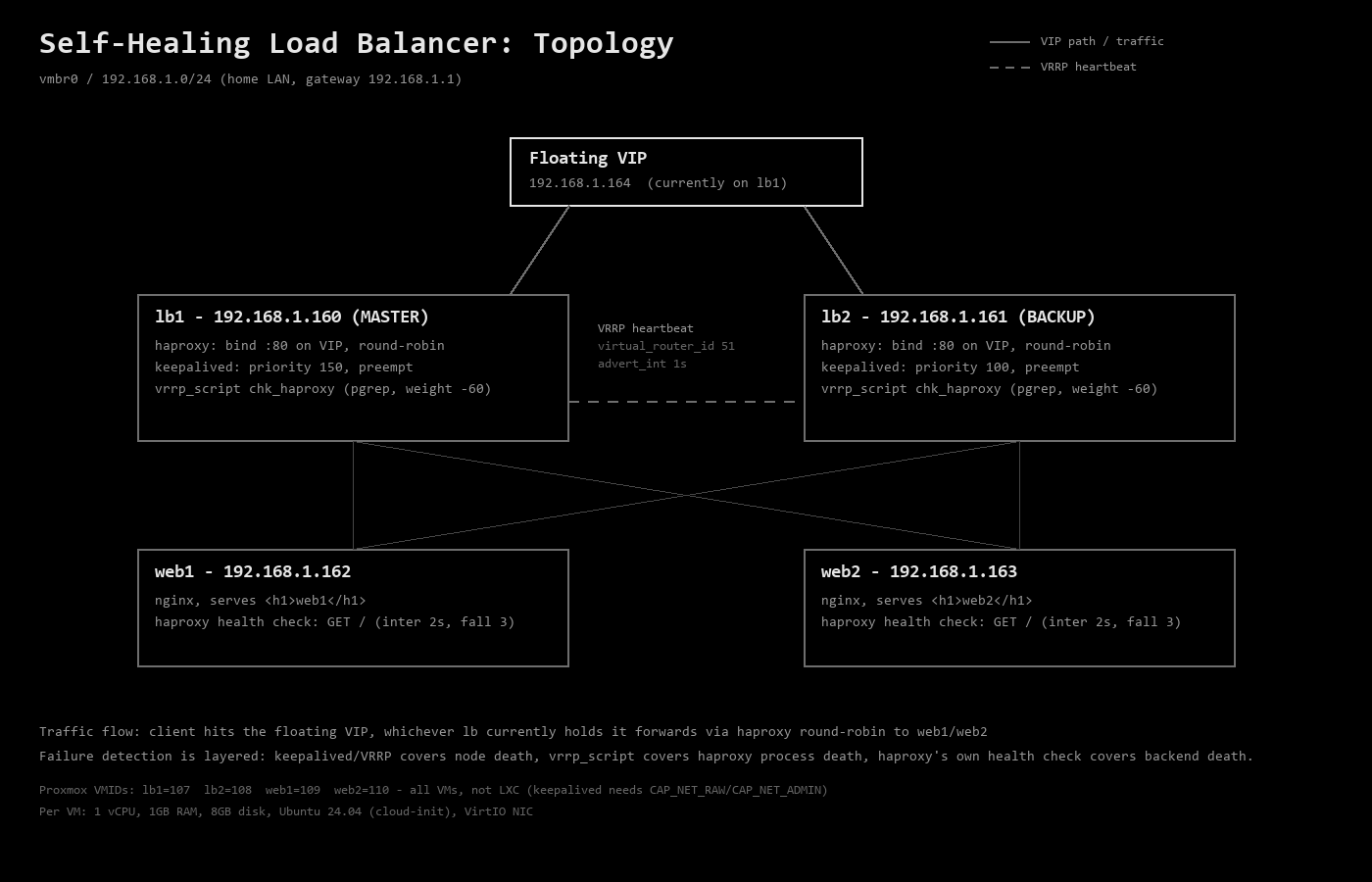
I kept the setup deliberately simple: two HAProxy nodes, lb1 and lb2, sharing one floating IP and load-balancing across two plain nginx backends, web1 and web2. All four live on Proxmox, on the same flat home LAN as everything else in the lab, with no bridging into Network Automation's or Home Lab's networks. I wanted this one to stand entirely on its own.
I built all four as full VMs instead of LXC containers. keepalived's VRRP implementation needs raw-socket capabilities that an unprivileged container blocks by default, and that failure mode isn't loud: a container boots clean, logs clean, and simply never elects a MASTER. Four VMs cost more RAM than four containers, and I'd rather spend the RAM than chase a failure that never announces itself.
I provisioned all four from a cloud-init template over SSH rather than clicking through the manual installer: one Ubuntu 24.04 image, cloned four times with static IPs baked in. Each VM runs 1 vCPU, 1GB of RAM, and an 8GB disk on a VirtIO NIC. lb1 and lb2 run HAProxy and keepalived; web1 and web2 run plain nginx, each one serving its own hostname on / so a failover shows up in the response itself, not just in a log line.
Before touching keepalived, I checked each new VM's Hardware and Options tabs against the existing pfSense and Wazuh baseline, matching CPU type and confirming onboot was set correctly on all four.
How VRRP Decides Who's in Charge
keepalived speaks VRRP, and the mechanism is simpler than the acronym suggests. Both nodes agree on a virtual_router_id, and whichever one has the higher priority holds the floating IP and calls itself MASTER. The other sits at BACKUP, listening for advertisements every advert_int seconds. Stop hearing them, and BACKUP promotes itself.
I set lb1 to priority 150 and lb2 to 100, with preempt enabled on both. That means lb1 reclaims the IP automatically the moment it's healthy again, instead of leaving lb2 to keep serving indefinitely once it has taken over. I want that automatic recovery, since proving the system heals itself on its own is the entire point of this project.
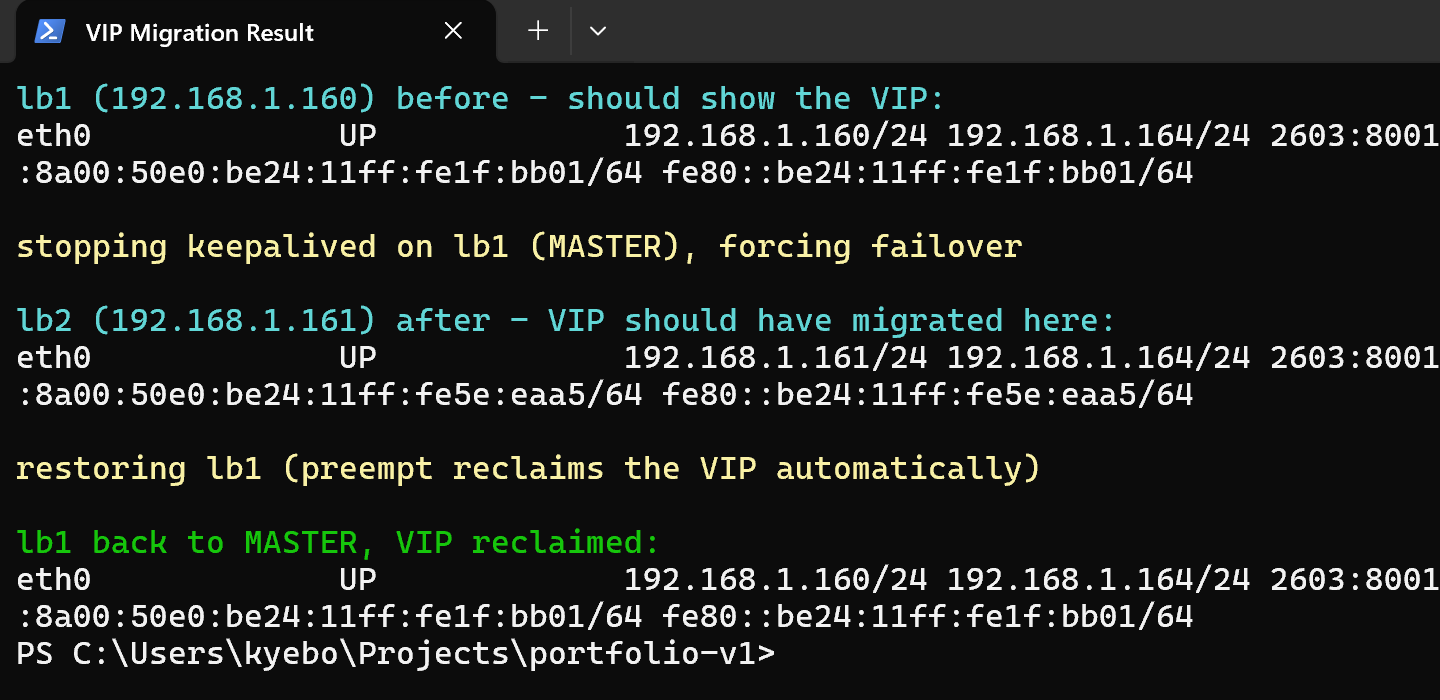
That screenshot is the whole mechanism in one shot: the IP sitting on lb1, lb1's keepalived getting stopped, the same IP showing up on lb2 a couple seconds later, then landing back on lb1 once it restarts. I never touched anything in between.
Making HAProxy VIP-Aware
HAProxy needs to bind to the floating IP on port 80, but by default Linux won't let a process bind to an address it doesn't currently hold. I set net.ipv4.ip_nonlocal_bind on both nodes before HAProxy ever starts, so it runs identically on both machines all the time, listening on the VIP whether it currently owns the address or not. keepalived and HAProxy never need to know about each other through notify-scripts this way. HAProxy is simply always ready, and the address appears or disappears underneath it.
I set health-check timing explicitly rather than leaving it on HAProxy's defaults: inter 2s, rise 2, fall 3 on the backend checks. Numbers I chose on purpose are numbers I can explain later.
Proof, Not Just a Diagram
A load balancer that should fail over isn't the same as one that does, and I wanted more than a browser tab refreshing to prove it. So the real deliverable here isn't the HAProxy config, it's a small Python script I wrote that hits the floating IP every 150 milliseconds, logs which backend answered and whether the request succeeded, and keeps going straight through whatever I break next.
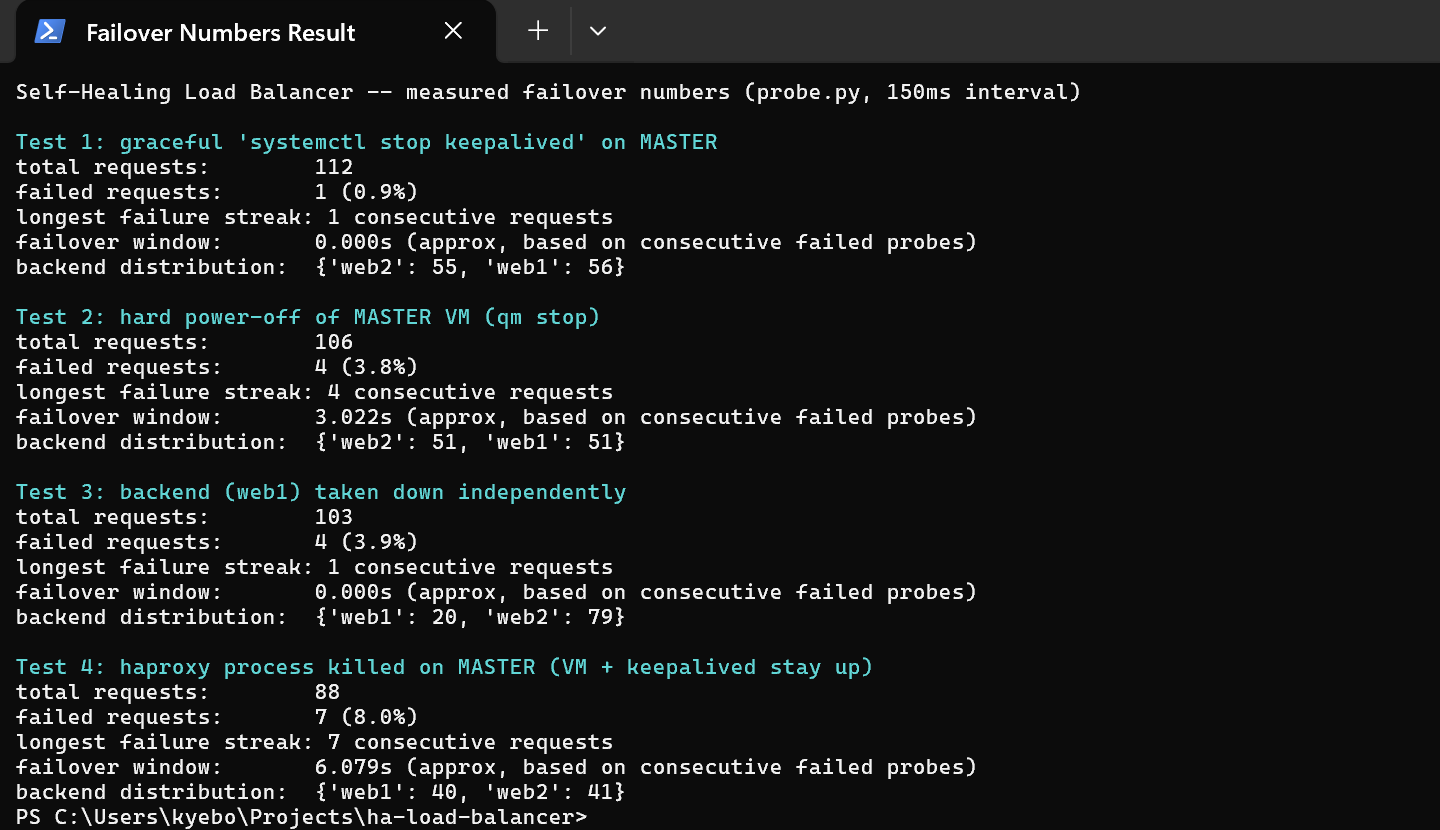
I ran four different failure tests, each one measured instead of assumed:
Graceful shutdown. I ran systemctl stop keepalived on the MASTER. keepalived gets to send one last advertisement on its way out. 1 dropped request out of 112. Effectively instant.
Hard power-off. I ran qm stop on the MASTER VM directly from the Proxmox host, the closest thing to actually pulling the plug. No goodbye message goes out at all, so BACKUP has to notice the silence instead: 4 dropped requests, and a 3.02 second gap. That number is almost exactly 3 x advert_int at the default 1-second interval, VRRP's own dead-time math holding up in practice, not just on paper.
A backend dying on its own. I stopped nginx on web1. 4 dropped requests, scattered as single misses instead of one gap: HAProxy's health check caught it and rerouted, and the floating IP never moved.
HAProxy itself dying. Killing the VM covers a dead node. It doesn't cover HAProxy crashing while the VM and keepalived both stay perfectly healthy, which would leave the floating IP sitting on a node with nothing behind it. I closed that gap with a vrrp_script that pings HAProxy's own process every 2 seconds and drops that node's priority hard if it's gone. I killed HAProxy directly to test it: 7 dropped requests, 6.08 seconds, floating IP correctly handed to the other node. Then, since I was already in there, I killed both backends at once too. HAProxy didn't crash, it just answered every request with a clean 503 until one came back.
The Purpose
What I ended up with is a load-balancing tier that survives four different ways of dying: a clean shutdown, a hard power-off, a dead backend, and a dead HAProxy process, each one caught and fixed by keepalived, VRRP, or HAProxy's own health checks without me touching a keyboard. I measured every failure directly instead of assuming it worked, so each one has a real, specific number attached to how bad it actually was and how fast the system recovered on its own.
Related Notes
- Home Lab and Network Automation build series, same ThinkPad this project shares